


When local spending softens by 5 to 10%, the damage doesn't announce itself. It shows up as a slow bleed — covers down six or seven a night, a prep list built for last month's volume, a Tuesday closing server who's standing around with nothing to do, and a walk-in full of product ordered against a forecast nobody updated.
Most owners know what to do in theory — cut hours, tighten par, test price. The problem is sequencing it fast enough that you're not carrying three weeks of overstaffing and over-purchasing while you "figure it out." This is a seven-day plan to do all of it inside one week, with actual worksheets and decision rules you can execute. If you want the broader strategic framing first, the operations checklist for right-sizing staffing, inventory and pricing pairs well with this. This post is the hands-on execution layer underneath it.
A week-long, shift-by-shift plan you can actually run without stopping service
Before you start: the three numbers that drive everything
You can't recalibrate anything without a clean baseline. Pull these before Day 1 so you're not guessing mid-week.
-
Trailing 4-week covers and net sales by daypart. Not weekly totals — by daypart. A 7% revenue dip is often really a 15% lunch collapse and a flat dinner.
-
Labor as a percent of sales, by shift. You want the actual worked hours, not scheduled. Scheduled hours lie.
-
Theoretical vs. actual food cost by category (proteins, produce, dry, beverage). If you don't have theoretical, use last month's actual as your anchor and move on — don't let a missing number stall the week.
Pull these before Day 1 so you're not guessing mid-week.
A common mistake here is pulling a single blended labor number ("28% of sales") and trying to cut against it. Blended numbers hide the shift where you're actually bleeding. The Thursday-close kitchen might be running fine at 24% while Saturday brunch sits at 41%. Cut the wrong shift and service suffers for no savings.
The short-horizon forecasting worksheet (the core of the whole week)
Everything downstream — par levels, schedules, pricing — depends on a credible next-7-day forecast under a declining-spend assumption. Here's the worksheet logic.
Eliminate operational bottlenecks effortlessly.
Dineoly helps you manage every reservation, order, and staff shift seamlessly.
- Unified reservation and order management
- Real-time staff scheduling
- Inventory and sales tracking
No credit card required
Step 1 — Build your baseline daily covers. Average the same weekday across the last 4 weeks. So your "baseline Tuesday" = average of the last four Tuesdays' covers.
Step 2 — Apply the decline scenario. Model three cases so you're not betting the week on one guess:
| Scenario | Multiplier | Baseline Tue covers (example: 180) | Forecasted covers |
|---|---|---|---|
| Mild (−5%) | 0.95 | 180 | 171 |
| Moderate (−7.5%) | 0.925 | 180 | 167 |
| Severe (−10%) | 0.90 | 180 | 162 |
Step 3 — Convert covers to sales. Multiply forecasted covers by your trailing average check. If your average check is $34:
-
−5%
171 × $34 ≈ $5,814
-
−7.5%
167 × $34 ≈ $5,678
-
−10%
162 × $34 ≈ $5,508
Step 4 — Flag the daypart split. Apply your historical daypart percentages (say 35% lunch / 65% dinner) so prep and staffing decisions line up with when the covers actually show.
One pattern worth watching: when spending contracts, average check usually drops before covers do. People still come in, they just skip the appetizer or the second round. Run a second version of the worksheet where covers hold flat but check drops 6–8%. If that scenario looks worse than your −7.5% cover scenario, your pricing and menu-mix levers matter more than your staffing levers this week.
This workflow is the heart of the week's decision-making; visualize it to keep the team aligned.
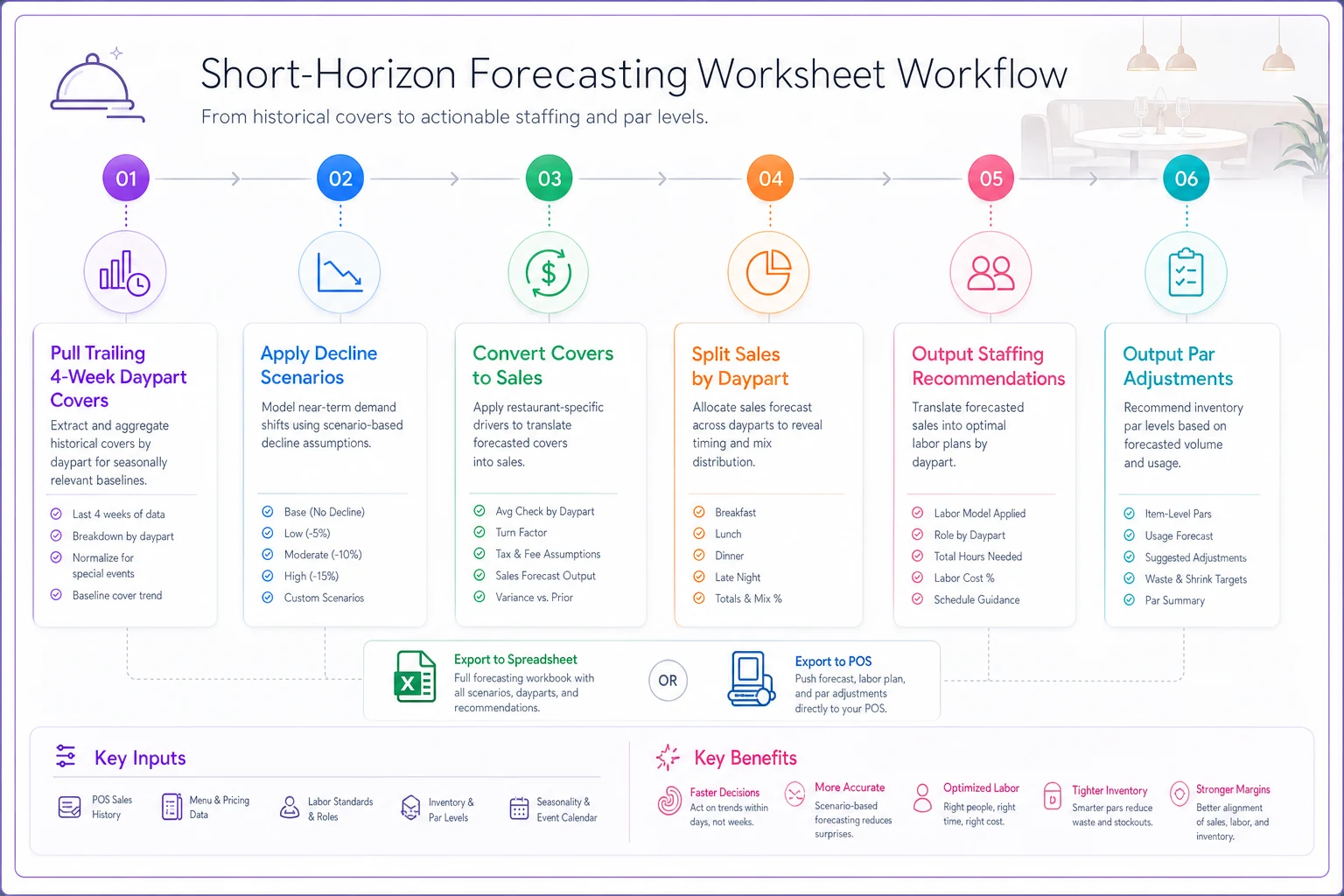
Use a simple flow: data pull → scenario apply → covers→sales → daypart split → staffing & par actions.
Day-by-day execution plan
Built to run Monday-start, but shift the days to match your slowest-to-busiest cycle.
Day 1 (Monday) — Data pull and forecast lock
-
Pull the three baseline numbers above.
-
Export POS sales by daypart, item, and shift (mapping notes below).
-
Build the three-scenario forecast worksheet.
-
Decision by end of day which scenario are you planning against? Default to −7.5% unless you have a specific reason to go higher or lower. Planning against the middle case and adjusting is cheaper than planning against −5% and getting caught short on cuts.
Day 2 (Tuesday) — Labor recalibration
-
Take the locked forecast and rebuild the schedule against covers-per-labor-hour targets, by shift.
-
Identify the two or three shifts with the worst labor-to-sales ratios under the new forecast.
-
Protect your floor positions — you can't open with one line cook to save $60 without blowing ticket times and losing more in walkouts.
-
Reschedule, don't just cut. Move a strong Saturday server off a dead Tuesday rather than reducing headcount everywhere.
Day 3 (Wednesday) — Par-level reset
-
Recalculate pars against the new forecast (spreadsheet logic below).
-
Adjust the next two standing orders with suppliers before they lock.
-
Walk the cooler and dry storage. Anything you're now over-par on becomes a feature on the specials board before it dies.
Day 4 (Thursday) — Pricing-test design and prep recalibration
-
Design the pricing test (sample size and run-length rules below). Don't launch it yet — design it.
-
Rebuild prep sheets against forecasted covers by daypart. This is where over-prep hides; a prep list built for 180 covers when you're running 162 is roughly 10% waste baked in daily.
Day 5 (Friday) — Launch and watch
-
Launch the pricing test on the pre-selected items.
-
Run the new schedule and new pars live for the first high-volume day.
-
Manager spends the shift watching the control-loop dashboard (layout below), not working a station.
Day 6 (Saturday) — Peak stress test
-
Your cuts get tested here. If service breaks on your busiest day, your labor cut went too deep on a floor position.
-
Log every exception
long ticket times, 86'd items from tight pars, comped plates from pacing issues.
Day 7 (Sunday) — Review and set next week's defaults
-
Compare forecast vs. actual covers, sales, labor %, and food cost.
-
Decide what carries forward and what rolls back (rollback rules below).
Compare forecast vs. actual covers, sales, labor %, and food cost.
The par-calculation spreadsheet logic
Par levels are where over-purchasing quietly compounds during a downturn, because pars are usually set once and forgotten. Here's the recalculation:
Par = (Forecasted usage over lead time + Safety stock) − On-hand
-
Forecasted dinner covers over 3-day lead time (−7.5% scenario)
~310 covers
-
Attach rate (% of covers ordering a chicken dish)
22% → ~68 portions
-
Portion size
6 oz → ~26 lbs needed
-
Safety stock (buffer for forecast error, ~15%)
~4 lbs
-
Par = 30 lbs. On-hand 11 lbs → order 19 lbs.
The mistake that shows up constantly: safety stock set as a flat percentage that never gets revisited. During a declining-spend week, forecast error and spoilage risk both increase, so on perishable, fast-moving items, tighten safety stock and order more frequently in smaller amounts. On shelf-stable items, safety stock is cheap insurance — leave it alone.
POS export mapping (so your spreadsheets don't break)
Nothing kills a one-week plan faster than fighting your POS export every morning. Map these fields once:
-
Business date (not calendar timestamp — closing a shift at 1
14 a.m. should map to the prior business date).
-
Daypart (define the time boundaries explicitly; don't trust the POS default).
-
Item ID + category (you'll group by category for food cost and by item for the pricing test).
-
Net sales, discounts, voids as separate columns.
-
Covers (guest count, not check count — a four-top is one check, four covers).
The most common export error: using check count as covers. It makes your average check look inflated and your covers look low, and every downstream forecast inherits that distortion.
Decision-rule matrix: thresholds and triggers
This is what turns the dashboard from "interesting numbers" into "do this now." Set the thresholds before the week starts, so you're not making judgment calls under Saturday pressure.
| KPI | Green | Yellow (watch) | Red (act) | Trigger action |
|---|---|---|---|---|
| Labor % of sales (by shift) | ≤ target | +2 to +4 pts over | > +4 pts over | Cut next scheduled non-floor position or send one early |
| Covers vs. forecast | within ±5% | −5% to −12% | > −12% | Pull a prep item, send support staff early |
| Food cost variance | ≤ 1 pt | 1–3 pts | > 3 pts | Investigate top 3 variance items, check portioning |
| Item 86 rate (par-driven) | 0–1/shift | 2–3/shift | 4+/shift | Par set too tight, raise safety stock on that item |
| Pricing-test item mix shift | < 5% drop | 5–10% drop | > 10% drop | Rollback trigger approaching |
The discipline that makes this work: the person watching the dashboard has pre-authorized authority to pull the trigger. If every yellow requires the owner's phone call, nothing happens until it's already red.
Pricing-test design: sample size, run length, rollback
A declining-spend week is exactly when people panic-raise prices and then can't tell if it worked. Design the test so you can actually read the result.
What to test: 3–5 items, not the whole menu. Pick mid-popularity items with healthy margin — not your top seller (too risky) and not a dog (no signal).
Price move: 4–7% on the test items. Below 3% the signal gets lost in daily noise; above 8% you're testing shock, not elasticity.
Run length: minimum 7 service days, ideally matched day-types. Comparing a test Saturday to a baseline Tuesday is how you fool yourself.
Sample size rule of thumb: you want at least 40–50 orders of the test item over the run to read a mix shift with any confidence. If an item sells 3 a day, it won't clear that bar in a week — pick something higher-volume.
Rollback rules (decide in advance):
-
If item mix drops more than 10% and category contribution margin doesn't improve, roll back.
-
If you get more than two unsolicited guest complaints about that specific item's price, roll back and note it.
-
If mix holds within 5% and margin improves, keep it and expand the test next week.
Don't launch without the rollback rules decided — testing without exit rules is how you lose guest goodwill for no marginal gain.
Role-by-role micro-checklists
Cuts and tightened pars only work if the floor-level routines absorb them without breaking. Keep these short enough to actually get used.
Opening (kitchen):
-
Check prep sheet against today's forecast, not yesterday's habit
-
Verify par-driven items are stocked to the new numbers
-
Flag any item already below reorder for the manager
Closing (FOH):
-
Log covers vs. forecast variance for the shift
-
Note any 86'd items and the time they ran out
-
Flag pricing-test items that drew guest comments
Prep:
-
Prep to forecasted covers by daypart, not a fixed batch
-
Top-up midday rather than over-prepping at open on soft days
Cross-training check (the downturn lever most people skip):
-
Identify which one person per shift can cover a second station
-
On a soft night, that's who lets you run one fewer body without breaking service
Cross-training is what makes labor cuts survivable. The restaurants that get hurt by cutting staff are the ones with zero positional flexibility — lose one server and the whole section collapses. The ones that handle a −7.5% week without much drama usually have two or three people per shift who can slide between roles.
A simple P&L impact model (worked scenario)
Here's how the week actually moves the numbers. Casual restaurant, ~180 weekday covers, $34 average check, running at a −7.5% spend decline.
Before recalibration (carrying old staffing and pars into a soft week):
-
Weekly sales
down to ~$39,700 (from ~$42,900)
-
Labor still scheduled at old volume
~30% of sales → ~$11,900
-
Food cost with over-purchasing waste
~31% → ~$12,300
-
Combined prime cost
~62%
After the 7-day recalibration:
-
Sales
roughly flat at ~$39,700 (you didn't fix demand in a week — that's not the goal)
-
Labor rescheduled to forecast
~27.5% → ~$10,900 (~$1,000/week saved)
-
Food cost with tightened pars and specials-board recovery
~29% → ~$11,500 (~$800/week saved)
-
Combined prime cost
~56.5%
That's roughly $1,800 a week in recovered margin, or somewhere around $7k–$8k a month, without touching demand. The recoverable money sits almost entirely in carrying old plans into new volume, not in the demand drop itself.
Sample daily control-loop dashboard layout
Build this in Excel or any BI tool. One screen, refreshed each shift. The columns are deliberately boring — boring is what gets checked.
| Metric | Forecast | Actual | Variance | Status |
|---|---|---|---|---|
| Covers (lunch) | 63 | 58 | −8% | Yellow |
| Covers (dinner) | 104 | 101 | −3% | Green |
| Labor % (lunch) | 26% | 29% | +3 | Yellow |
| Labor % (dinner) | 27% | 27% | 0 | Green |
| Food cost variance | — | +2.1 pts | — | Yellow |
| 86 events | 0 | 1 | — | Green |
| Pricing-test mix | base | −4% | −4% | Green |
The habit that makes it stick: the manager updates it at shift change and the yellow/red cells trigger the pre-written action from the decision matrix. Without that link, it's just a report nobody acts on.
Keeping this data clean — covers vs. checks, business date vs. timestamp, consistent daypart definitions — is where workflow software earns its place. When POS exports map cleanly into forecasting and par worksheets automatically, the manager spends the shift acting on the dashboard instead of rebuilding it in a spreadsheet every morning. That's the difference between a plan that runs for one week and one that becomes your standing operating rhythm.
When this whole plan makes sense — and when it doesn't
Run the full 7-day version when: the spending decline looks like it's holding for more than a couple of weeks, your prime cost is already tight, and you have at least some positional flexibility in staffing to absorb cuts.
Don't run the aggressive version when: the dip is clearly a one-week anomaly — a holiday weekend, a weather event, a street closure. Slashing staffing and pars against a temporary blip means you're understaffed and under-stocked the week it bounces back, and recovering from under-par is slower than trimming over-par.
Who should skip the pricing test entirely: if you raised prices in the last 60 days, sit this lever out. Stacking a second increase on guests during a soft period is how a 7% spending dip becomes a 15% covers drop that's largely your own doing.
The real scenario
A neighborhood bistro — around 1,100 covers a week, $38 average check — watched lunch covers fade roughly 11% over three weeks while dinner held flat. For the first two weeks they changed nothing; the schedule and prep sheets were still built for the old lunch volume. Labor on the lunch shift crept to around 34% of sales and the prep team was throwing out produce most afternoons.
They ran a version of this week. The forecast immediately flagged that the problem was concentrated at lunch, so the cuts went there — one fewer server and a trimmed prep batch on weekdays, nothing touched at dinner. Pars on fast-spoiling lunch items dropped and shifted to smaller, more frequent orders. They tested a 5% bump on two mid-tier dinner items; mix barely moved and margin improved slightly, so it stayed.
By the end of the second week on the new rhythm, lunch labor was back near 28%, afternoon produce waste dropped significantly, and combined prime cost came off by a little over four points. Covers never recovered during that stretch — demand was demand — but the margin they were bleeding every week had mostly stopped leaking. That's the whole game during a soft spell: you can't always fix the top line in seven days, but you can stop carrying last month's plan into this month's volume.
That's the whole game during a soft spell: you can't always fix the top line in seven days, but you can stop carrying last month's plan into this month's volume.
Ready to elevate your restaurant operations?
Join 2,000+ restaurants using Dineoly to enhance efficiency, increase table turnover, and delight diners.