


Nobody tells you this when you open your second or third location: your P&L comparisons stop meaning anything the moment the units stop being identical. And they're never identical. One sits in an office district that dies on weekends. One has a 40-seat patio that's useless four months a year. One pays $19/hour because of a tight labor market, the other $15. You line up their P&Ls side by side, spot a 6-point labor gap, and march into the "worse" store ready to fix it — when the gap is almost entirely explained by trade area and seat count.
The core problem with multi-unit restaurant benchmarking is that raw numbers reward and punish managers for things they don't control. A good operator in a hard location looks mediocre. A lazy operator in a goldmine looks like a star. Until you normalize the P&L — strip out the structural differences so you're comparing operating skill, not geography and footprint — you're basically rewarding luck.
This is a long one because the math matters. We'll cover the three normalization formulas that actually change decisions (RevPASH, plate margin, labor ratios), how to build cohorts so you're comparing fair peers, a decision tree for picking which site to fix first, and a couple of worked examples with the full cross-unit recipe.
The real reason cross-unit comparisons break
The usual story is "every location is different." True but useless. The more precise version: P&L lines mix three different kinds of variance, and most operators never separate them.
-
Structural variance — seat count, square footage, trade area demographics, operating hours, daypart mix. Baked in. The manager can't change it this quarter.
-
Input-cost variance — local wage rates, regional food costs, rent, utility rates. Partly controllable over long horizons, not controllable in a weekly review.
-
Operating variance — scheduling discipline, prep accuracy, upsell execution, waste, comp discipline. This is the stuff you actually want to benchmark.
Raw P&L smashes all three together. When you see Store A at 31% labor and Store B at 28%, you have no idea how much of that 3-point gap is operating skill versus Store A simply being open an extra daypart with a lower-volume brunch dragging productivity down.
Normalization is the discipline of pulling structural and input variance out so the operating variance is what's left. That's the whole game.
The three formulas that actually change decisions
You can normalize a dozen things. In practice, three move the needle on multi-unit decisions. Everything else is noise until these are clean.
Eliminate operational bottlenecks effortlessly.
Dineoly helps you manage every reservation, order, and staff shift seamlessly.
- Unified reservation and order management
- Real-time staff scheduling
- Inventory and sales tracking
No credit card required
RevPASH, normalized for capacity and open hours
RevPASH — Revenue Per Available Seat Hour — is the single best top-line efficiency metric for comparing units that differ in size. Revenue alone tells you nothing (bigger store, bigger number). Revenue per seat is better but still ignores how long the doors are open.
Base formula:
``
RevPASH = Net Revenue / (Seats × Open Hours)
``
The mistake almost everyone makes is using total seats and total hours without adjusting for seats that aren't realistically sellable. A 120-seat room where 25 seats are a dead corner nobody wants, or a patio that's closed half the year, inflates the denominator and makes a good operator look weak.
The normalized version uses effective seats and effective hours:
``
Normalized RevPASH = Net Revenue / (Effective Seats × Effective Open Hours)
``
Effective seats discount unsellable or seasonal capacity. A simple approach that holds up: count a seat at full weight if it sells during peak, half weight if it only moves on overflow nights, zero if it's essentially storage. Patios get weighted by months-usable — a patio open 7 of 12 months contributes 7/12 of its seats to the annual denominator.
When you normalize RevPASH across a group, the surprises are fairly consistent: the "low revenue" store in the small footprint is frequently the most efficient operator in the portfolio. It just never had the seats to post a big number.
Plate margin, normalized for menu mix and regional cost
Food cost percentage is the laziest cross-unit metric there is. Two stores running 30% food cost can be wildly different operators if one sells a steak-heavy mix (naturally higher cost %, higher absolute margin) and the other sells apps and pasta.
What you actually want is plate margin normalized to a common menu mix — so you're measuring kitchen discipline and purchasing, not which store happens to sell more high-cost entrées.
The recipe:
``
Normalized Plate Margin = Σ (Item Margin × Portfolio-Weighted Mix %)
``
Instead of weighting each item by that store's local sales mix, you weight every store's item margins by a fixed portfolio mix — the blended mix across all units. Now every store is scored as if it sold the same basket. The only thing that varies is each store's actual per-plate margin, which reflects their yields, waste, and local purchasing.
-
As-is plate margin (what actually hit the P&L)
-
Cost-indexed plate margin (reprice every store's ingredients to a reference cost basket)
The gap between a store's as-is and cost-indexed margin tells you how much of its margin problem is purchasing/geography versus execution. If the cost-indexed number snaps back to the group average, the manager is executing fine — the problem is the supplier contract, which is a different conversation entirely.
Labor ratios, normalized for daypart and service model
Labor as a percent of sales is the number most managers get beaten up over, and it's also the most misleading without normalization. Labor % is driven heavily by average check and daypart mix, neither of which the manager fully controls.
A store doing a big low-check breakfast daypart will always carry a worse labor % than a dinner-only store, because you still need bodies on the floor but the checks are smaller. Punishing that manager for a high labor % is punishing them for the schedule the brand handed them.
Sales per labor hour (SPLH):
``
SPLH = Net Revenue / Total Labor Hours
``
Normalized labor %, adjusted to a reference check and daypart mix:
``
Normalized Labor % = Actual Labor $ / (Covers × Reference Avg Check)
``
Using a reference average check instead of the store's actual check strips out the small-ticket penalty. Now you're measuring whether the store staffed appropriately for its volume, not whether it happens to serve expensive food.
Pair SPLH with normalized labor % and the picture gets honest fast. A store can have a "bad" raw labor % and a strong SPLH — meaning the crew is productive, the checks are just small. That's a menu and pricing problem, not a scheduling problem.
This connects directly to how you link labor to the P&L in-shift, which is a whole discipline on its own — we went deep on that in the piece on mapping daily control loops to the P&L with in-shift margin impact.
Cohorts: you can't benchmark a store against the wrong peers
Even with perfect normalization formulas, if you rank all 11 stores on one leaderboard, you're still comparing an airport kiosk to a suburban full-service dining room. Normalization reduces the noise; cohorts remove the apples-to-oranges problem entirely.
-
Service model (counter/fast-casual vs. full service vs. bar-forward)
-
Volume band (e.g., under $1.2M, $1.2–2.5M, $2.5M+)
-
Daypart profile (breakfast-heavy, lunch-heavy, dinner-only, late-night)
-
Trade area type (urban office, suburban retail, destination, residential)
-
Maturity (open <12 months behaves nothing like a 5-year store)
You don't need all five for every cohort. In a smaller group, two or three variables usually produce clean enough buckets. A typical small-portfolio setup might land on three cohorts: "suburban full-service dinner," "urban lunch-driven," and "new openings under 12 months."
A typical small-portfolio setup might land on three cohorts: "suburban full-service dinner," "urban lunch-driven," and "new openings under 12 months."
| Metric | Raw version (misleading) | Normalized version | What the normalization removes |
|---|---|---|---|
| Top-line efficiency | Total revenue | RevPASH on effective seats × effective hours | Store size, seasonal/dead seats, open-hour differences |
| Margin | Food cost % | Portfolio-mix-weighted plate margin, cost-indexed | Menu mix bias, regional input-cost differences |
| Labor | Labor % of sales | SPLH + labor % at reference check/daypart | Average-check penalty, daypart mix |
| Fair comparison | One big leaderboard | Cohort-based ranking | Service model, volume band, trade area, maturity |
One rule that saves you: never benchmark a store as an outlier of one. If a unit doesn't have at least two or three real peers, don't rank it — track it against its own trailing history instead. A cohort of one is just a story you tell yourself.
A decision tree for which site to fix first
Once the numbers are normalized and cohorted, you'll usually have several stores flagging at once. Limited bandwidth means you can't attack all of them. This is the diagnostic order that keeps you from wasting a month on the wrong fire:
-
Is the store below its cohort median on normalized RevPASH? - Yes → the problem is demand capture or throughput (seating, turns, upsell), not cost. Go to step 2. - No → RevPASH is fine; the issue is cost discipline. Skip to step 4.
-
Is low RevPASH driven by covers or by average check? (Split it
covers per seat-hour vs. check.) - Covers low → throughput/seating/demand problem. Look at turn times, host flow, wait management. - Check low → menu/upsell/pricing problem. Different team, different fix.
-
Does the store's SPLH hold up despite low RevPASH? - Yes → crew is productive, the ceiling is demand. Don't cut labor — you'll wreck service and kill recovery. Fix the top line. - No → you have both a demand and a productivity problem; fix scheduling alongside demand.
-
For cost-flagged stores
does cost-indexed plate margin snap back to cohort average?
- Yes → it's purchasing/supplier/geography. Escalate to procurement, not the GM. - No → it's kitchen execution: yields, portioning, waste. That's an on-site operations fix. -
Does normalized labor % at reference check exceed cohort by more than ~2 points? - Yes → genuine scheduling/overstaffing issue. On-site intervention. - No → the raw labor % was lying; leave the schedule alone.
The pattern worth internalizing: a demand problem and a cost problem look identical on a raw P&L, and they require opposite interventions. Cut labor at a store that actually has a demand ceiling and you make it worse. The whole point of the tree is to stop you from applying a cost fix to a demand problem.
Worked example: a three-unit cross-normalization
Say you've got three full-service units in roughly the same cohort — similar service model, dinner-weighted, suburban.
-
Store A 90 effective seats, open ~70 hours/week, net revenue around $38k/week.
-
Store B 140 effective seats (patio counted at partial weight), ~75 hours/week, net revenue around $49k/week.
-
Store C 85 effective seats, ~68 hours/week, net revenue around $31k/week.
Raw revenue says B is the winner and C is the laggard. Now normalize.
RevPASH:
-
A
$38,000 / (90 × 70) = ~$6.03
-
B
$49,000 / (140 × 75) = ~$4.67
-
C
$31,000 / (85 × 68) = ~$5.36
Flip the ranking. Store C, the "small, low-revenue" unit, is the second-most efficient seat-hour operator in the group. Store B, the revenue leader, is actually leaving the most on the table per available seat — it's coasting on size.
Labor: suppose raw labor % runs A at 29%, B at 27%, C at 32%. C looks like the problem child. But C's average check runs lower because of its menu mix. Rerun labor at a reference check of, say, $34 across all three:
C's normalized labor % drops close to the group — because the "high" labor % was largely a small-ticket penalty, not overstaffing. B's normalized labor % barely moves — its labor looks efficient partly because big checks flatter the ratio, but its SPLH is only middling.
Plate margin: reweight all three to the portfolio mix and cost-index to a common basket. If C's cost-indexed margin lands right on the cohort average while its as-is margin trails, you've found it: C is executing fine, but it's paying more for inputs. That's a supplier conversation, not a "why is your food cost high" lecture to the GM.
So the raw-P&L conclusion — "C is weak, B is strong, fix C's labor" — was wrong on every count. The real takeaway: B needs a throughput and upsell push (great seats, soft RevPASH), and C needs a purchasing fix at the group level, not an operational crackdown.
That's the entire value of normalization in one example — it reroutes your attention from the obvious-but-wrong store to the actually-fixable problem.
When this makes sense — and when it doesn't
When normalized benchmarking earns its keep:
-
You have at least four or five units and comparisons have started driving real decisions — bonuses, interventions, which GM gets coached.
-
Your locations differ meaningfully in size, daypart, or trade area, which is almost always the case.
-
You're about to make a staffing or menu change at a "problem" store and want to be sure you're treating the right disease.
When it's overkill:
-
Two or three near-identical units in the same trade area. Raw comparison plus common sense is fine; building a cohort framework for three stores is mostly ceremony.
-
If you don't yet have clean, consistent data across units, stop. Normalization on garbage inputs produces confident, precise garbage. Get your data fields and reconciliation cadence solid first — the same consistency the operational backbone that links reservations, staffing, orders and inventory depends on.
Who should not do this: anyone planning to use a single normalized leaderboard to set manager bonuses without context. Normalization makes comparisons fairer, not perfect. A store can be bottom-of-cohort for reasons the GM genuinely can't touch this quarter. Use the numbers to aim your attention, not to hand out verdicts.
A short real scenario
A small group running four suburban full-service units kept hammering one GM over a labor line that sat 3–4 points above the others, quarter after quarter. The GM kept trimming the schedule, service suffered, the labor % barely budged, and turnover climbed.
When they finally ran labor at a reference check and looked at SPLH, the store was actually in the top half of the group on productivity. The high labor % was almost entirely explained by a lower average check — that location skewed toward a lunch crowd and lighter orders. The schedule was never the problem. They stopped cutting hours, redirected the effort toward check-building (menu placement, a couple of attachment items, a small lunch-combo test), and over the next couple of quarters the normalized gap mostly closed on its own. The GM, who'd been on a performance plan for a problem that didn't exist, stayed.
That's the quiet cost of un-normalized benchmarking: you burn out good operators chasing variance they can't control.
Keeping it running without drowning in spreadsheets
The formulas aren't hard. The hard part is doing this consistently — every period, across every unit, with inputs that actually line up. Same revenue definitions, same labor categories, same menu-item mapping. That's where most hand-built benchmarking dies. Someone builds a beautiful normalized model once, it impresses everyone at the quarterly review, and then nobody has the four hours a month to rebuild it with fresh data.
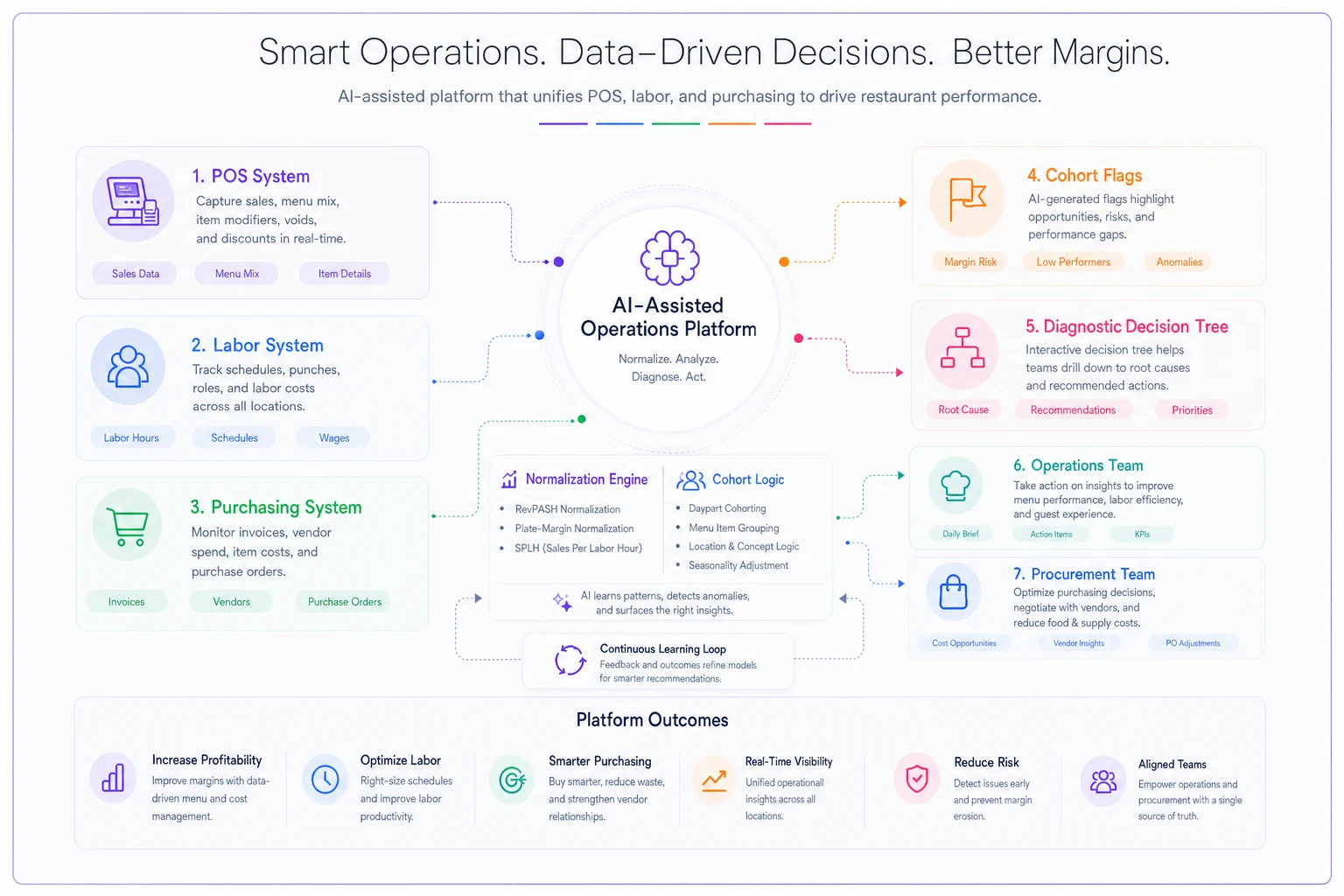
This is the practical case for pulling it into AI-assisted operational software rather than a spreadsheet one person maintains. When POS, labor, and purchasing feed a shared system, the normalization and cohort logic can run on every close automatically — flagging which stores crossed their cohort thresholds and surfacing the right diagnostic (demand problem here, purchasing problem there) instead of leaving managers to eyeball a raw P&L. The value isn't the dashboard; it's that the fair comparison happens every period without someone remembering to do the math, and the decision tree gets applied consistently.
Automate the three core normalizations first — RevPASH, plate-margin reweighting, and SPLH — so cohort flags are reliable each period.
Tool or no tool, the discipline comes first. Get the three formulas clean, build honest cohorts, and run the diagnostic order before you intervene. Do that and you'll stop fixing the stores that aren't broken — and start finding the ones that quietly are.
Tool or no tool, the discipline comes first. Get the three formulas clean, build honest cohorts, and run the diagnostic order before you intervene. Do that and you'll stop fixing the stores that aren't broken — and start finding the ones that quietly are.
Ready to elevate your restaurant operations?
Join 2,000+ restaurants using Dineoly to enhance efficiency, increase table turnover, and delight diners.