
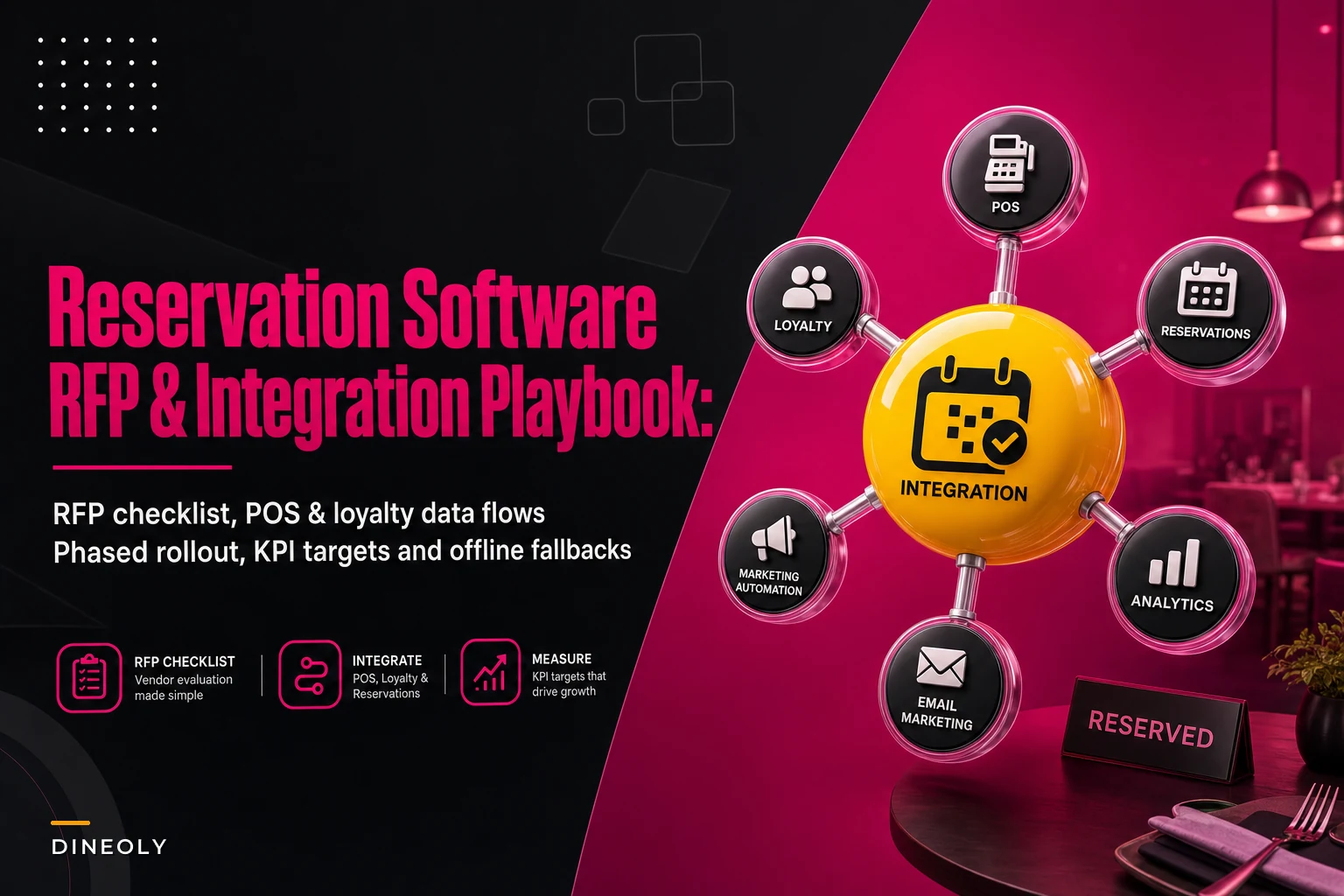

Most reservation software decisions get made backwards. Someone sees a slick demo at a trade show, falls in love with the floor-plan drag-and-drop, signs a contract, and then six weeks later the host stand is a mess because nobody checked whether the system could actually push covers into the POS in real time. The software wasn't bad. The evaluation was.
The hard part of choosing restaurant reservation software isn't comparing feature lists — vendors all claim the same features. The hard part is figuring out which features matter for your service style, how the system will behave during a Friday 7:30 rush, and whether you can switch platforms without the hostess team quietly going back to paper for a week because they don't trust it.
This guide walks through the full procurement and rollout: an RFP you can actually send, a prioritized feature checklist, the integration and privacy questions that get skipped, a rollout timeline that won't disrupt service, the KPIs that tell you if it's working, and the contingencies for when it inevitably hiccups mid-shift.
Start with your failure modes, not the feature list
Before you look at a single vendor, write down the specific ways your current booking process fails. Almost everyone skips this step, and it's the one that makes the whole evaluation actually useful.
-
Double-books that happen because phone and online reservations live in two systems that don't sync.
-
Phantom availability where the online widget shows 7
00 open but the floor is slammed because walk-ins aren't counted.
-
No visibility into pacing, so the kitchen gets hit with twelve mains at once.
-
Lost guest history — the regular who always sits in the back and drinks Sancerre is a stranger every time they walk in.
Write yours down with rough frequency. "We lose about 3–5 covers a week to double-books." "Hosts spend maybe 20 minutes a shift reconciling the book." Now you have evaluation criteria that are actually yours, not the vendor's.
A feature only matters if it fixes a failure mode you've named. A gorgeous waitlist tool is worthless to a fine-dining room that doesn't run a waitlist. Score vendors against your failures, not their brochure.
The prioritized feature checklist
Not all features carry equal weight. Rank them into three tiers so you don't get dazzled by nice-to-haves while a deal-breaker slips through.
Eliminate operational bottlenecks effortlessly.
Dineoly helps you manage every reservation, order, and staff shift seamlessly.
- Unified reservation and order management
- Real-time staff scheduling
- Inventory and sales tracking
No credit card required
Tier 1 — Non-negotiable (if it fails here, disqualify):
-
Real-time, two-way sync with your POS (covers, check status, table status)
-
Reliable availability logic that accounts for walk-ins, pacing, and turn times
-
Offline / degraded mode that lets hosts keep seating when the internet drops
-
Guest data export in a usable format (you own your data, not the vendor)
-
Role-based permissions (host vs. manager vs. owner)
Tier 2 — Strongly preferred:
-
Automated confirmations and reminders (SMS + email) with customizable timing
-
Deposit / card-hold capture for high-demand slots and large parties
-
Waitlist with SMS paging and quoted wait times
-
Guest profiles with notes, tags, visit history, and spend
-
Shift-level and table-level reporting
Tier 3 — Nice to have:
-
Floor-plan visual editor
-
Marketing/review integrations
-
Loyalty tie-ins
-
Multi-language guest-facing widgets
The mistake most operators make is treating floor-plan aesthetics as Tier 1 and offline fallback as an afterthought. In real service, the floor plan is a convenience. The offline mode is what saves your Saturday when the ISP goes down at 6:45.
The RFP template you can actually send
Keep it tight. A two-page RFP that forces specific answers beats a twenty-page document nobody reads carefully. Here's the structure:
1. Business context (you fill this in)
-
Concept type, number of seats, average covers per day, service style, number of locations.
-
Current systems
POS, waitlist, CRM.
-
Top 3 problems you're solving (pull from your failure-modes list).
2. Questions for the vendor — require specific answers:
-
Describe exactly how your system syncs with [our POS]. Is it real-time, batch, or webhook-based? What's the typical sync latency?
-
What happens to seating operations when the restaurant loses internet? Walk us through the degraded-mode workflow.
-
How is availability calculated? How do you account for walk-ins and variable turn times?
-
What guest data do you store, where is it hosted, and how do we export or delete it?
-
What is your uptime over the last 12 months? Provide the incident history.
-
What does onboarding look like, and who owns data migration from our current book?
-
Pricing
per-cover, flat, or tiered? What are the fees per online booking, SMS, and cover? Are there charges for reservations the guest initiated through a marketplace?
-
What's the contract term, and what's the data-portability process if we leave?
That last cluster — cover fees and marketplace charges — is where surprise costs live. A platform that charges per seated cover from its own network can quietly skim real money off your volume. Model it against your actual numbers before signing.
POS, data, and privacy: the integration checklist
Integration is where good reservation systems and bad ones actually separate. The guest-facing side can look identical while the back-end behaves completely differently.
-
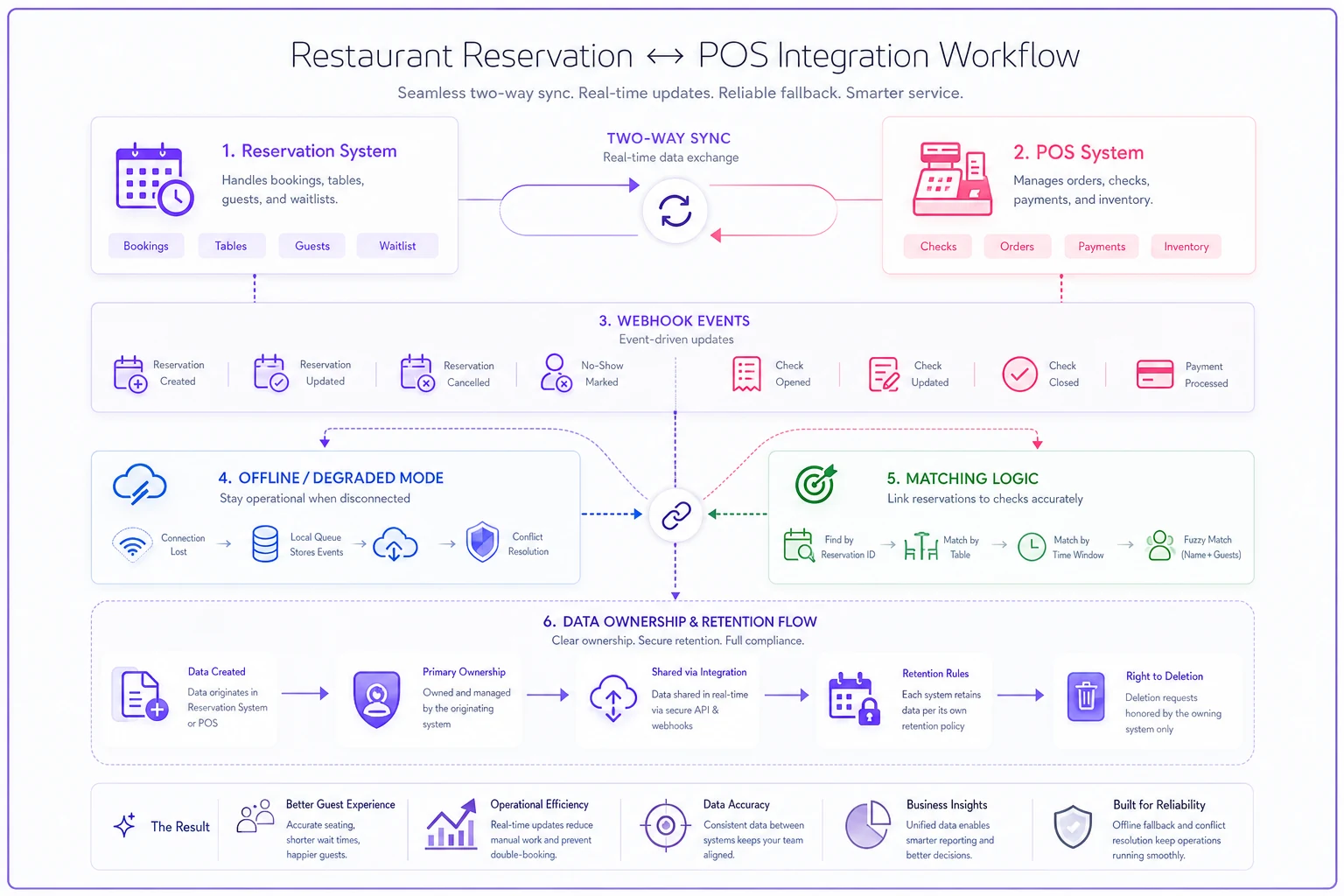
Sync direction Confirm it's genuinely two-way. Reservations should create or link to POS checks, and table status (seated, check dropped, paid) should flow back so the host sees live table states.
-
Sync method and latency Webhook-based near-real-time is ideal. Batch syncs that run every few minutes cause phantom availability during peak service.
-
Matching logic How does a reservation attach to a check? If it's manual, hosts will skip it under pressure and your guest-spend data will be garbage.
-
Data fields owned Get a written list of fields stored (name, phone, email, visit count, spend, notes, allergy tags).
-
Privacy and retention Where is data hosted? What's the retention policy? Can guests request deletion, and can you fulfill that in the system?
-
Access controls Who on staff can see phone numbers and guest spend? Export permissions should be manager-level only.
If you want a deeper framework for structuring vendor data responsibilities, the way you define field ownership, sync cadence, and reconciliation should live in a formal agreement — the same discipline covered in our restaurant technology data contracts playbook applies directly to reservation vendors. Nail this down before signing, because renegotiating data terms after go-live is nearly impossible.
A quick look at how integration quality actually shows up on the floor:
| Scenario | Weak integration | Strong integration |
|---|---|---|
| Walk-in party of 4 seated | Online widget still shows table open | Availability updates within seconds |
| Guest arrives for 7pm booking | Host manually finds check | Reservation auto-links to POS check |
| Internet drops at 6:45 | Hosts fall back to paper, lose the book | Degraded mode keeps local seating state |
| End-of-night reporting | Spend per reservation incomplete | Clean cover-to-spend attribution |
Here's a quick visual of the integration workflow.
Nail this down before signing, because renegotiating data terms after go-live is nearly impossible.
Rollout timeline that doesn't disrupt service
The biggest implementation mistake is flipping the switch all at once during a busy week. Phase it. Here's a timeline that works for single-location rollouts — multi-location just repeats the pilot loop per site.
-
Weeks 1–2
Contract, data mapping, and migration prep.
Export your current guest list and reservation history. Map fields to the new system. Decide what you keep and what you leave behind. -
Week 3
Sandbox and configuration.
Build your floor plan, turn times, pacing rules, and permissions in a test environment. Have a manager place 30–40 fake reservations and seat them to stress-test availability logic. -
Week 4
Parallel run (quiet shifts only).
Run the new system alongside your old book during slower services — lunches, early weeknights. Hosts use both. You're checking whether sync holds and whether availability matches reality. -
Week 5
Staff training in context.
Train hosts on the real floor, during a real (quiet) shift, not in a conference room. Cover the normal flow and the offline fallback. Make them practice the degraded-mode workflow deliberately. -
Week 6
Full cutover on a controlled night.
Pick a moderately busy — not peak — service. Have a manager and the vendor's support on standby. Keep the old book printed as a safety net for one more week. -
Weeks 7–8
Monitor, tune, and retire the old system.
Watch for pacing complaints from the kitchen, double-book reports, and host workarounds. Only retire the paper backup once hosts stop reaching for it.
Train hosts on quiet real shifts so they practice the offline workflow before they need it on a busy night.
Teams that train on quiet real shifts adopt faster than teams trained in a classroom. Context matters. A host who's learned the offline workflow before they need it stays calm when the router dies at 7pm on a Saturday.
KPIs: how to know it's actually working
Set baseline numbers before cutover or you'll never prove the ROI. Track these:
-
Online booking conversion sessions on your booking widget vs. completed reservations. A clunky widget often sits around 20–30%; a good one should climb noticeably.
-
No-show rate confirmed covers that don't arrive. Deposits and well-timed reminders typically pull this down from the 10–15% range many full-service rooms live with into low single digits for high-demand slots.
-
Table turnover covers per table per service. Watch this doesn't drop post-launch — a sign your pacing rules are too conservative.
-
Revenue per available seat-hour (RevPASH) the one that ties it all together. Divide revenue by available seat-hours. This catches whether you're filling seats and pacing them well.
-
Host time on reconciliation rough, but real. If hosts spent 20 minutes a shift fixing the book and now spend 5, that's recovered labor.
Don't chase all five at once. Pick the one tied to your biggest named failure mode and watch it for a full month post-cutover before declaring victory.
If no-shows are your primary pain, pair the software's reminder and deposit tools with an actual confirmation and recovery process — the tooling only works when the host workflow around it is defined.
A real scenario
A 90-seat neighborhood bistro, two services a day, mostly reservations with some walk-ins. Their problem was concrete: online and phone bookings lived in two places, and they were losing roughly 3–4 covers a week to double-books, plus a no-show rate hovering around 12% on weekend prime time.
They scored three vendors against their own failure list. The flashiest one lost on Tier 1 — its POS sync was batch, not real-time, which would have kept the phantom-availability problem alive. They picked the less exciting option with genuine two-way sync and a solid offline mode.
Rollout followed the phased timeline — parallel run on Tuesdays and Wednesdays, cutover on a Thursday. After about two months: no-shows on prime weekend slots dropped into the 4–5% range once card-holds were required on parties of six-plus, double-books effectively disappeared, and the host team got back roughly 15 minutes a shift they used to burn reconciling the book. RevPASH ticked up a few percent — not dramatic, but steady and real.
Nothing magic happened. They evaluated against real problems, integrated properly, and rolled out without breaking a single Saturday.
Contingencies: what to do when it breaks mid-service
It will break at some point. The restaurants that handle it well are the ones that rehearsed.
Offline fallback:
-
Keep a printed copy of the night's book at the host stand, refreshed before each service.
-
Train hosts to switch to local/offline mode automatically when the system is unreachable — and to log new seatings on paper so you can reconcile after.
-
Know your vendor's degraded-mode behavior cold. Some cache locally; some don't.
Incident playbook (host-stand version):
-
If the system is slow or down, switch to the printed book immediately. Don't wait and hope.
-
Notify the manager; manager pings vendor support with the incident time.
-
Keep seating off the paper book; mark walk-ins manually.
-
When the system recovers, reconcile paper seatings back in before end of shift.
-
Log the incident — duration, cause, covers affected — for your vendor review.
Keeping a simple incident log matters beyond just reservations. Documenting what failed, when, and who was notified mirrors the broader approach in our operational resilience and incident communications playbook, and it's what turns a chaotic outage into a 20-minute blip instead of a service-wide fire.
When this makes sense — and when it doesn't
When investing in robust reservation software clearly pays off:
-
You do meaningful reservation volume and currently juggle phone and online bookings in separate systems.
-
No-shows or double-books cost you real covers weekly.
-
You're scaling to multiple locations and need consistent data and reporting.
When it's probably overkill:
-
A small, mostly walk-in room with occasional bookings — a lightweight tool or even a well-run paper book may serve you fine, and the cover fees won't earn their keep.
-
A concept where every table is first-come. Don't pay for pacing engines you'll never use.
Who should slow down: Anyone about to sign based on a demo without testing the POS sync and offline mode against their own service. The demo is the vendor's best day. Your Friday rush is the real test.
Bringing it together
Good reservation software doesn't announce itself. The host stand just gets quieter, double-books stop, the kitchen stops getting slammed by bad pacing, and the no-show deposits do their quiet work in the background. That outcome comes almost entirely from the work before the contract — naming your failure modes, scoring Tier 1 features honestly, pinning down integration and data terms, and rolling out in phases that never put a real service at risk.
Buy against your problems, not the brochure. Test the integration like it's going to fail, because eventually it will. Rehearse the offline fallback before you need it. Do those things and the software becomes invisible in the best way — which, for anything at the host stand during a Friday rush, is exactly what you want.
For the broader financial context on where reservation efficiency fits into margin protection, it's worth connecting these KPIs back to your P&L the way we lay out in the FinOps and pricing recalibration guide — because recovered covers and lower no-shows only matter if they show up in the numbers that run the business.
For the broader financial context on where reservation efficiency fits into margin protection, it's worth connecting these KPIs back to your P&L the way we lay out in the FinOps and pricing recalibration guide — because recovered covers and lower no-shows only matter if they show up in the numbers that run the business.
Ready to elevate your restaurant operations?
Join 2,000+ restaurants using Dineoly to enhance efficiency, increase table turnover, and delight diners.