

The demo always looks clean. The vendor pulls up a slick order flow, a sample menu, a loyalty widget, and everything syncs in under a second. Then you sign, roll it out to eleven locations, and discover that the KDS doesn't fire modifier changes, the delivery marketplace menu drifts every time a GM edits a price, and your weekly reconciliation now takes a full day because the export doesn't match your POS daily sales.
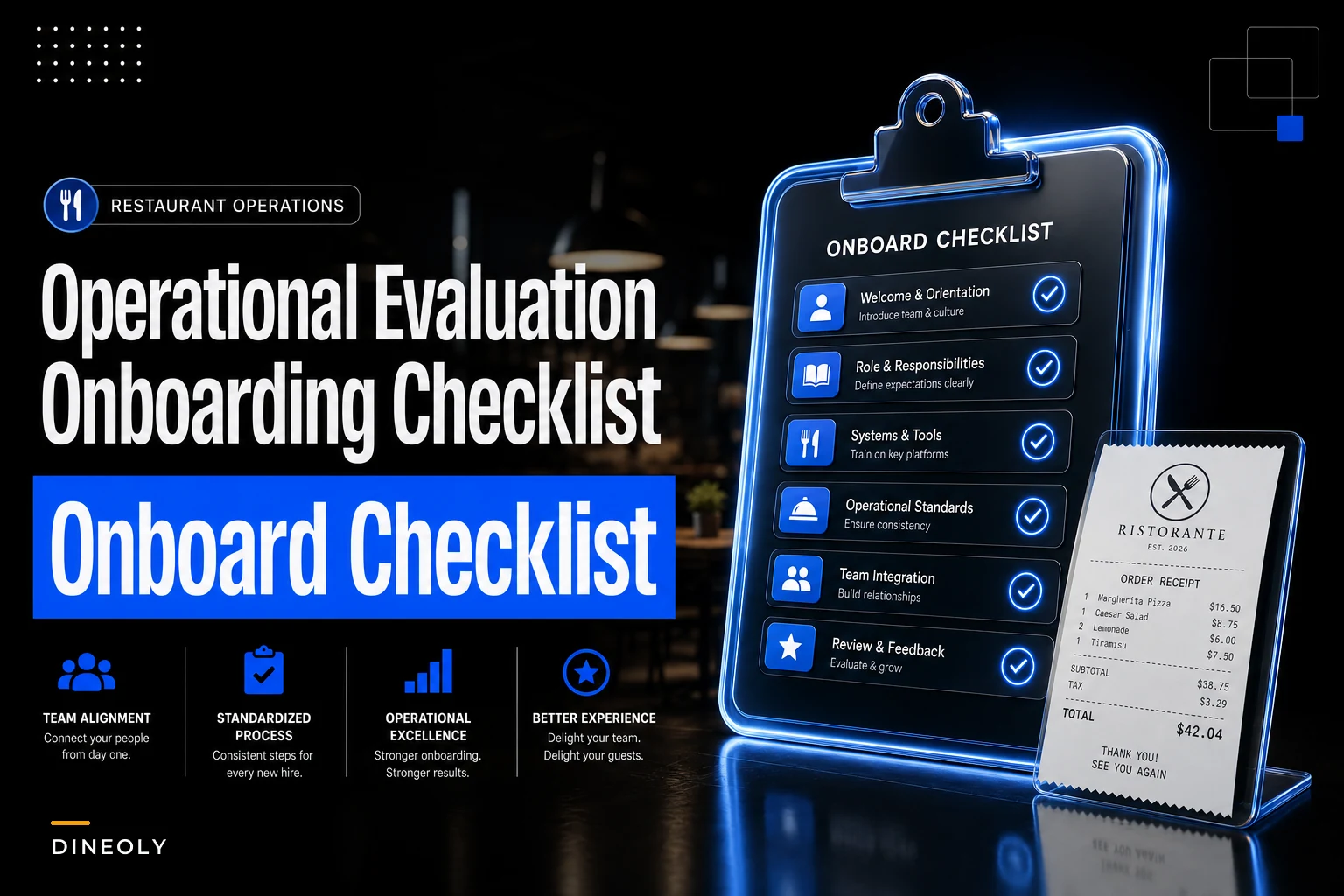
That gap — between the demo and the eighth week of live operations — is what this checklist is built to close. Below is a section-by-section evaluation and onboarding framework with non-negotiables, red flags, and sample acceptance criteria you can test during a pilot. Treat it less like a feature comparison and more like a set of trip-wires that stop you from signing something that quietly breaks your operation.
1) Required Integrations: POS, KDS, Loyalty, Payments, Delivery Marketplaces
Integration is where most online ordering decisions are won or lost, and it's also where vendors are most willing to fudge the truth. "We integrate with your POS" can mean a real-time bidirectional API, or it can mean a nightly flat-file import that silently drops voids.
Pin down the direction and latency of each integration. A one-way menu push is not the same as a two-way sync that reflects 86'd items back to the ordering page in real time.
Non-negotiables
-
Orders inject directly into the POS (not re-keyed by staff) with correct order type, table/pickup tags, and modifiers intact
-
KDS receives the full ticket including special instructions and allergen flags, not a truncated version
-
Menu changes flow from one source of truth — ideally POS or a central menu manager — to all channels, not edited per-channel
-
Payments settle into your existing merchant structure without forcing a new processor you can't reconcile against
-
Delivery marketplace orders (DoorDash, Uber Eats, etc.) land in the same queue so the expo isn't juggling three tablets
Red flags
-
"Integration" turns out to be email or PDF ticket forwarding
-
Modifier mapping has to be rebuilt manually per location
-
The vendor can't tell you the sync latency in seconds
-
86'ing an item in the POS doesn't remove it from online ordering
Sample acceptance criteria (go/no-go)
-
Place 20 test orders across all channels; 100% inject into POS with correct modifiers and order type
-
86 an item at the POS; it disappears from all online menus within 60 seconds
-
A price change at the central menu reflects across web, app, and at least one marketplace within 5 minutes
Run modifier-heavy test orders through each integration during the pilot.
Worth naming: the integrations that break most often aren't the big ones. It's the modifier edge cases — "no onions, extra sauce on the side, sub fries for salad" — that collapse into garbage on the kitchen screen. Test the ugly orders, not the clean ones.
2) Data Flows and Ownership: Orders, Guest Profiles, Sales/Reconciliation Exports
One question separates a tool you control from a tool that controls you: if you leave this vendor in 18 months, what data do you walk away with, and in what format?
Eliminate operational bottlenecks effortlessly.
Dineoly helps you manage every reservation, order, and staff shift seamlessly.
- Unified reservation and order management
- Real-time staff scheduling
- Inventory and sales tracking
No credit card required
A lot of operators don't ask until they're mid-divorce from a platform and realize their entire guest list — names, emails, order history — is locked behind an export that only produces aggregate counts.
Non-negotiables
-
You own guest profiles (email, phone, order history) and can export them in a structured format on demand
-
Order-level data exports include gross sales, discounts, taxes, tips, fees, and channel attribution
-
Reconciliation exports reconcile line-by-line to your POS daily sales, not just a daily total
-
Clear contractual language on data ownership and post-termination export rights
Red flags
-
Guest data is "available" only inside the vendor's marketing dashboard with no raw export
-
Reconciliation files that aggregate away the detail you need to chase a variance
-
Any clause suggesting the vendor owns or can monetize your guest list
Sample acceptance criteria
-
Export one day of orders; every line reconciles to the POS within a rounding tolerance of a few cents
-
Pull a guest export and confirm it contains contactable fields plus lifetime order count and value
This connects directly to how you build repeat business. If guest data lives in a silo you can't query, your customer lifecycle marketing architecture is dead on arrival — you can't segment or re-engage guests you can't see. Treat the data export as a marketing asset, not just a compliance checkbox.
A related reconciliation discipline worth borrowing: the same line-level matching you'd apply in your FinOps and daily control loops should govern how you audit ordering-platform payouts. If the export can't support it, the platform fails this section.
3) Fee and Pricing Models: Transaction Fees, Gateway, Monthly SaaS, Bundle Pitfalls
Pricing on these platforms is deliberately hard to compare because the costs are spread across four or five line items that each vendor bundles differently. One quotes a low SaaS fee and makes it back on a fat payment gateway markup. Another waives the gateway and charges per-order.
The only way to compare honestly is to model your actual blended cost per order at your real volume and ticket size.
| Cost component | How it's usually charged | What to watch for |
|---|---|---|
| Monthly SaaS | Flat per-location fee | Scales badly across many units; negotiate volume tiers |
| Transaction/order fee | Flat cents or % per order | Low-ticket orders get crushed by flat fees |
| Payment gateway | % + fixed per transaction | Hidden markup above interchange |
| Marketplace commission | 15–30% per order | Separate from platform fee — stacks on top |
| "Bundle" add-ons | Loyalty, SMS, QR | Often priced per-message or per-member later |
Non-negotiables
-
A written, itemized fee schedule covering every line above
-
Blended cost-per-order modeled at your average ticket, not the vendor's example
-
Clarity on who eats processing fees on refunds and chargebacks
Red flags
-
Vendor resists breaking out the payment gateway margin
-
"Free" loyalty or marketing that becomes per-message billing at scale
-
Price increases not capped in the contract
Sample acceptance criteria
-
Build a model
if your average online ticket is around $28 and you do roughly 900 orders/month per location, the all-in cost should land in a range you can defend against your margin, not a mystery
A typical example that bites multi-unit operators: a platform charges a modest $99/month per location, which looks fine. Across 14 locations that's about $1,400 — but the real cost is the 2.9% + $0.30 gateway on roughly $350k in monthly online volume, which runs well over $10k. The SaaS line was the distraction. The gateway was the actual decision.
4) Kitchen & Fulfillment Operational Changes: Packing, Routing, KDS Layout, Prep Timing
Software decisions become kitchen decisions the moment orders start flowing. A platform that dumps delivery, pickup, and dine-in onto the same KDS lane without differentiation will wreck your expo during peak.
The operational changes are predictable but routinely under-planned.
Non-negotiables
-
KDS can separate or tag order types so prep timing matches fulfillment (a delivery order shouldn't fire at the same moment as a 20-minute-out pickup)
-
Quoted prep/ready times are configurable per daypart and adjust under load
-
Packing station workflow defined
who bags, where orders stage, how they're labeled
-
Routing logic that batches nearby deliveries without overloading a single driver window
Red flags
-
Every channel hits one undifferentiated ticket queue
-
Ready-time estimates are static and ignore kitchen load
-
No staging/labeling plan, so pickup orders pile up unidentified on a shelf
Sample acceptance criteria
-
During a simulated rush of 30 mixed-channel orders, the KDS correctly sequences by fulfillment time and no order sits more than a few minutes past its ready estimate
-
Packing error rate (wrong/missing items) under 2% across the pilot
The overlooked piece is prep timing honesty. When the platform promises a 15-minute pickup but the kitchen is slammed, the guest shows up to wait, gets frustrated, and leaves a bad review. A static quote time is a guest-experience liability disguised as a config setting. Tie the quoted time to real kitchen state, or inflate it defensively during known peaks.
5) Finance and Fraud Controls: Reconciliation Cadence, Chargeback Evidence, Tipping Treatment
Online ordering introduces fraud and chargeback exposure your dine-in business never had. Card-not-present disputes are easier for customers to file and harder to win without the right evidence captured automatically.
Non-negotiables
-
A reconciliation cadence you can actually run — daily payout matching to orders, weekly rollups
-
Platform captures and stores chargeback evidence (order timestamp, delivery confirmation, IP, device, AVS result)
-
Tipping is treated correctly for payroll and tax — tips flow through to the right pool and are clearly separated in exports
-
Refund and void authority controls so a single GM can't silently comp away margin online
Red flags
-
Chargeback disputes require you to manually assemble evidence the platform already had
-
Tips commingled with sales in exports, creating payroll headaches
-
No way to see online refunds by location and reason
Sample acceptance criteria
-
Trigger a test dispute; the platform produces a complete evidence packet without manual digging
-
Tips reconcile exactly to the payroll export for the pilot period
One finance detail operators miss: the cadence matters more than the tool. A platform with perfect reconciliation data still fails you if nobody runs the match daily and variances pile up unexamined for three weeks. Build the cadence into someone's job before go-live, not after you find a $4k hole.
When a dispute escalates or a guest incident gets loud online, the financial workflow needs to connect to your communications process — the same discipline you'd apply in a brand-protecting incident response playbook applies when a chargeback turns into a public complaint.
6) Guest UX and Marketing Controls: Menu Sync, Promos, Loyalty, Recovery
A good ordering platform is also a marketing surface, but only if you control it. The failure mode is a platform where menus drift, promos can't be targeted, and loyalty lives in a walled garden.
Non-negotiables
-
Menu, pricing, photos, and availability sync from one source across web, app, and marketplaces
-
Promo engine supports targeting (first-time guest, lapsed, specific daypart) not just blanket discounts
-
Loyalty ties to the guest profile you own and reconciles to actual redemptions
-
Abandoned-cart and post-order recovery flows you can configure
Red flags
-
Menu edits must be made separately per channel (guaranteed drift)
-
Promos are all-or-nothing with no segmentation
-
Loyalty points can't be audited against revenue
Sample acceptance criteria
-
Edit a menu item once; verify it propagates to every channel within the agreed sync window
-
Launch a targeted promo to lapsed guests and confirm attribution shows redemptions and incremental revenue
The pattern worth flagging: discount leakage. Platforms that make blanket promos easy and targeted promos hard will quietly train your team to discount everyone. A 15% "welcome" code with no new-customer restriction gets shared on deal sites and shows up on orders from your most loyal regulars — you're paying to discount sales you'd have made at full price.
7) Rollout & Pilot Plan: Metrics, A/B Design, Rollback Triggers
Don't roll out to every location at once. The pilot exists to catch the integration and operational failures from sections 1–6 before they're multiplied across your whole footprint.
A practical pilot sequence:
-
Pick 2–3 representative locations — one high-volume, one average, one with a quirky menu or layout. Avoid piloting only on your best-run store; you'll miss the failure modes.
-
Define success metrics before launch — order injection accuracy, average quoted-vs-actual ready time, packing error rate, reconciliation match rate, guest rating on online orders.
-
Run a parallel period where the old and new flows coexist, so you can compare rather than guess.
-
Design the A/B honestly — if you're testing the new platform against a legacy one, split by daypart or channel, not by cherry-picked shifts.
-
Set explicit rollback triggers — written in advance, not argued about mid-crisis.
-
Run for at least 3–4 full weeks to catch weekend peaks and a full reconciliation cycle.
-
Hold a go/no-go review against the acceptance criteria from every section above.
Sample rollback triggers (any one = pause):
-
Order injection accuracy drops below 97%
-
Reconciliation variance exceeds a threshold you can't explain within 48 hours
-
Packing error complaints spike above baseline
-
KDS sequencing failures during peak force manual workarounds
The mistake is treating the pilot as a formality — launching, declaring victory in week one, and rolling out before the first full reconciliation cycle exposes the export problems. The pilot only earns its keep if you're genuinely willing to say no at the end.
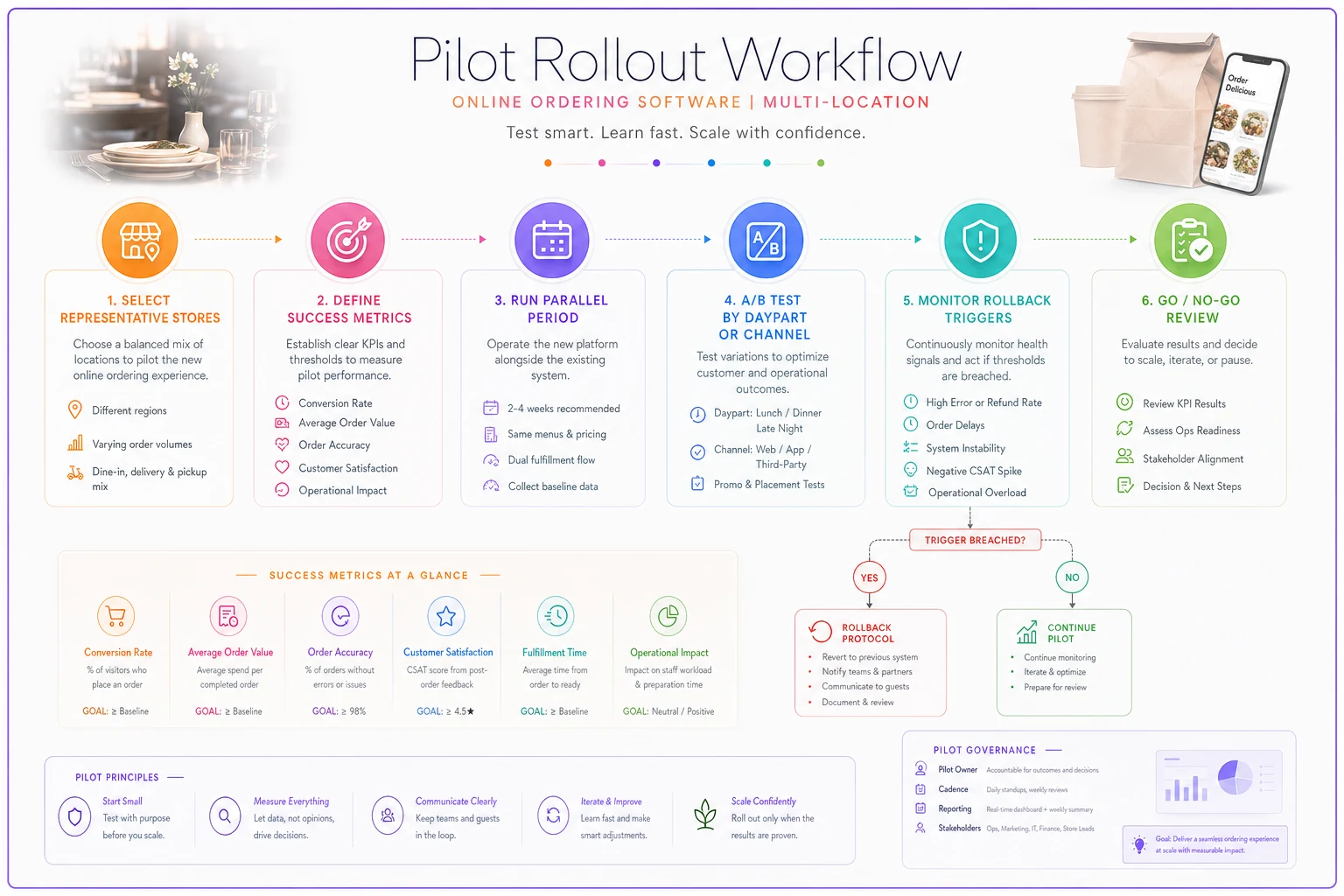
A quick visual of the pilot workflow.
8) Security, Compliance and SLA Expectations
This is the section nobody reads until there's an outage during Friday dinner. Online ordering touches payment data and guest PII, which means PCI scope and real uptime commitments aren't optional.
Non-negotiables
-
PCI DSS compliance with a clear statement of how the platform reduces your scope (tokenization, hosted payment fields)
-
Documented uptime SLA with credits — and clarity on what "uptime" excludes
-
Data handling and breach-notification terms in the contract
-
Defined support response times by severity, especially for order-flow-down incidents during service
Red flags
-
Vague "we take security seriously" language with no PCI attestation
-
No SLA, or an SLA with no remedy when they miss it
-
Support that routes a "we can't take online orders" emergency into a 24-hour ticket queue
Sample acceptance criteria
-
Vendor provides current PCI attestation and a written SLA with at least 99.9% uptime and defined severity-based response times
-
A test "critical" support ticket during business hours gets a live response inside the promised window
The pattern across platforms: the SLA is only as good as the severity definitions. A 99.9% uptime promise means nothing if the vendor classifies "online ordering completely down during dinner rush" as a medium-priority issue. Pin down what counts as critical and what the clock looks like, in writing.
When This Evaluation Depth Actually Makes Sense (and When It's Overkill)
If you're a single location doing modest online volume, running this full pilot across eight sections is probably more rigor than you need — focus on the integrations and fee checks and move faster.
The full framework earns its time when:
-
You operate 5+ locations and a bad choice multiplies across all of them
-
Online ordering is already a meaningful slice of revenue (say, north of 20%)
-
You have franchisees or GMs who'll edit menus independently and create drift
-
Your reconciliation and finance stack can't absorb a messy export
Who should slow down and not rush this: any operator whose current reconciliation already has unexplained variances. Adding a new channel on top of a shaky finance process just hides the next problem in more noise. Fix the cadence first.
A Short Real Scenario
A six-unit fast-casual group switched platforms mostly to cut fees. The SaaS line looked great. But because they skipped the reconciliation acceptance test in Section 2, they didn't notice the export aggregated tips into gross sales. For about five weeks, payroll was reconciling tips by hand, and one location's variance quietly grew to roughly $3k–$4k before anyone traced it. They caught it, reran the pilot criteria they should've run upfront, and forced the vendor to fix the export mapping.
Order accuracy and fees were fine the whole time — the near-miss was entirely in the data flow they hadn't tested. After fixing it, daily reconciliation dropped from close to an hour of manual cleanup per location to a few minutes of matching. Nothing dramatic, just the difference between a platform you trust and one you babysit.
Bringing It Together
An online restaurant ordering software evaluation checklist isn't about scoring features on a spreadsheet — it's about testing the ugly edge cases, the data you walk away with, and the operational changes your kitchen has to absorb. The vendors that pass aren't the ones with the best demo; they're the ones whose integrations hold up under a messy modifier order, whose exports reconcile to the penny, and whose SLA treats a dinner-rush outage like the emergency it is.
Run the pilot on your weird locations, write the rollback triggers before you need them, and refuse to roll out until the acceptance criteria actually pass. The discipline you spend upfront is the difference between a platform that scales with you and one you spend the next year fighting.
Ready to elevate your restaurant operations?
Join 2,000+ restaurants using Dineoly to enhance efficiency, increase table turnover, and delight diners.