


Most restaurants don't have an integration problem. They have a definitions problem.
Your POS thinks a "cover" is a paid guest. Your reservation system counts a cover the moment a party is seated. Your labor scheduler treats a cover as a headcount projection three days out. When these three systems talk to each other — and eventually they all do — nobody agrees on what the number means. So the manager pulling up a Tuesday-morning report sees three different truths and picks whichever one supports the decision they already wanted to make.
That's the real cost of skipping data contracts. Not downtime. Not a failed API call. It's the slow erosion of trust in your own numbers, until the reorder decision, the prep sheet, and the schedule all get made on gut feel again — which is exactly what the software was supposed to fix.
This playbook covers the boring layer nobody wants to build: the agreement between operations and whoever handles your tech about which fields exist, what they mean, how often they sync, and how you catch it when they drift. Get this right and every downstream decision — prep, reorder, staffing — gets sharper. Get it wrong and you've bought expensive dashboards that lie politely.
Why the handoff breaks (and it's usually not the engineer's fault)
When a restaurant owner asks a developer or vendor to "connect the POS to the inventory system," the request sounds simple. It isn't, because the owner is carrying dozens of unspoken operational rules in their head that never make it into the spec.
A typical example: the kitchen decrements inventory when a dish fires, not when it's rung in, because comps and voids happen constantly and firing is the honest signal of what actually left the walk-in. The owner knows this instinctively. The engineer, working from a clean data model, ties inventory depletion to the order timestamp. Now your theoretical food cost and your real food cost are off by 4–6% and nobody notices for two months.
-
Undefined fields. "Sales" gets synced but nobody specified gross vs. net, whether it includes tax, or whether it's per-check or per-cover. Every report built on it inherits the ambiguity.
-
Mismatched timing. Inventory syncs nightly, but the prep decision happens at 7 a.m. off numbers that are already 12 hours stale during a weekend rush.
-
No reconciliation. Two systems slowly drift apart and there's no scheduled moment where anyone compares them, so the drift compounds until something visibly breaks.
If you've already worked through a restaurant data governance checklist, a data contract is the next layer down — governance decides what fields matter, contracts decide exactly how they behave when two systems exchange them.
What actually needs to be in a field-level contract (keep it minimal)
The instinct when writing a data contract is to document everything. Don't. A contract that maps 200 fields is a contract nobody maintains. The goal is to nail down only the fields that feed a manager decision, and specify those precisely.
Eliminate operational bottlenecks effortlessly.
Dineoly helps you manage every reservation, order, and staff shift seamlessly.
- Unified reservation and order management
- Real-time staff scheduling
- Inventory and sales tracking
No credit card required
-
Field name and plain-English definition. "net_sales = gross sales minus comps, voids, and discounts, excluding tax."
-
Source of truth. Which system owns this number. Only one system can own it; everyone else is a reader.
-
Format and units. Currency, decimals, timezone for timestamps. Timezone trips up more restaurants than you'd expect, especially around midnight closeouts.
-
Update trigger. What event changes this value — order fired, check closed, shift punched out.
-
Acceptable null behavior. What the downstream system should do if the field arrives empty. "Treat null covers as zero" is a decision, not an accident.
That's it. Five attributes per field. A single-location restaurant might have 15–20 fields that genuinely drive decisions. A contract covering those is maybe two pages and it prevents most of the disasters.
The mistake people make is documenting fields that are easy to document instead of the ones that are dangerous to leave undefined. Sales is easy and everyone gets it right. The killers are things like modifier-level pricing, void reason codes, and how 86'd items propagate — those never make the spec and always cause the argument later.
Prioritizing sync cadence by what the number is actually for
Not everything needs to sync in real time, and pretending it does is how you overpay for infrastructure and create noise. The right question isn't "how fast can we sync?" It's "what decision does this number feed, and when does that decision get made?"
Sync cadence should be reverse-engineered from the operational use case. A prep decision made once a day off yesterday's sales does not need live streaming. A line-level 86 during Saturday dinner absolutely does. Match the pipe to the decision.
Here's how the common restaurant data flows map to sensible cadences:
| Data / signal | Feeds this decision | Who acts on it | Sensible sync cadence |
|---|---|---|---|
| Item-level sales (yesterday) | Prep sheets, par adjustments | Kitchen lead, AM manager | Nightly batch, ready by 6 a.m. |
| Live 86 / low-count items | Menu availability, upsell steering | FOH + expo | Near real-time (seconds) |
| Labor punches vs. schedule | In-shift overtime control | Floor manager | Every 15–30 min during service |
| Inventory depletion | Reorder / purchasing | Kitchen manager, buyer | Hourly during prep, daily rollup |
| Reservation covers forecast | Staffing 3–7 days out | GM | Daily, plus event-driven on big changes |
| Waste / spoilage logs | Prep confidence, ordering | Kitchen manager | Per shift, reconciled daily |
Notice the pattern: the further out the decision, the more batch-friendly the sync. The closer to the moment of service, the more you need it live. Most restaurants get this exactly backwards — they'll spring for real-time inventory dashboards nobody looks at mid-shift while their labor data lags 40 minutes behind the point where an overtime alert would've actually mattered.
The other quiet trap is over-syncing reservation data. Covers projected seven days out change constantly and don't need to trickle into the staffing model every few minutes. A daily pull plus an event-driven update when a large party books or cancels is plenty, and it keeps your GM from reacting to noise.
Reconciliation checkpoints: the part everyone skips
A sync that runs flawlessly can still be wrong. Systems drift. A menu item gets renamed in the POS but not in the inventory mapping. A modifier gets added with no cost attached. The API succeeds every single time and quietly passes garbage.
This is why reconciliation checkpoints matter more than the sync itself. A reconciliation checkpoint is a scheduled, human-owned moment where two numbers that should match get compared, and a variance threshold triggers a closer look.
-
Daily Theoretical vs. actual sales from POS closeout. Flag anything over a 2% gap.
-
Weekly Inventory depletion (from sales) vs. counted usage. This is where recipe-mapping errors surface. Anything over roughly 5% variance on a high-volume item gets investigated.
-
Monthly Full field-mapping audit — did any menu items, modifiers, or categories get added or renamed without updating the contract mapping? This catches the slow drift that daily checks miss.
Most owners miss this: reconciliation isn't mainly about catching theft or waste, though it does catch both. It's about validating that your data contract still holds. When the weekly inventory number drifts, the first suspect shouldn't be the cook — it should be a broken field mapping. Check the plumbing before you check the people.
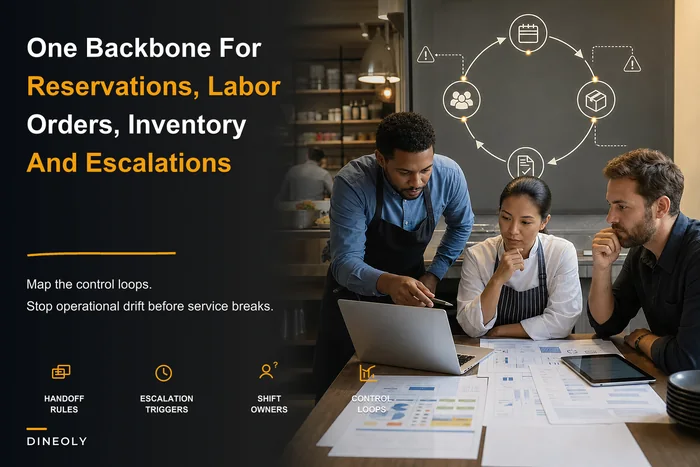
As you scale, reconciliation stops being something a sharp GM can eyeball and becomes a defined process with owners and thresholds. This is the same discipline that shows up in a real operational backbone — the control loops linking reservations, staffing, orders, and inventory only work if the numbers feeding them are periodically checked against reality.
An engineer-ready data contract template that maps to manager decisions
The piece that actually makes the handoff work is a template your engineer or vendor can build straight from, structured around decisions instead of tables. The header of the contract should name the manager decision it serves, so nobody loses the plot.
-
Contract header
-
- Decision served e.g., "Morning prep sheet generation"
-
- Manager who owns the decision AM Kitchen Lead
-
- Decision timing Daily, 6:00 a.m.
-
- Source-of-truth system POS
Field block (repeat per field)
-
- Field
itemsalesqty -
- Definition Count of each menu item sold, counting fired items, excluding voids
-
- Owner system POS
-
- Format integer, per menu item ID
-
- Update trigger item fired to kitchen
-
- Sync cadence nightly batch, complete by 5:30 a.m.
-
- Null behavior absent item = 0 sold
-
- Reconciliation weekly vs. counted usage, 5% variance threshold
Decision mapping (the part that's usually missing)
-
- How the field feeds the decision yesterday's
itemsalesqty× prep multiplier → suggested prep quantity, adjusted by day-of-week factor -
- Fallback if data is late/missing default to trailing 3-day average; flag manager
The three sample field blocks below map onto the three decisions that keep restaurants alive:
Prep decision — needs item-level sales history, waste logs, and day-of-week factors. Cadence: nightly. Fallback: trailing average.
Reorder decision — needs inventory depletion, on-hand counts, par levels, and supplier lead times. Cadence: hourly-to-daily. Fallback: last confirmed on-hand plus par.
Staffing decision — needs cover forecasts, historical sales-per-labor-hour, and live punch data. Cadence: daily for the schedule, 15-min for in-shift. Fallback: same-day-last-week schedule.
When the contract is written this way, an engineer can read it and know exactly what to build, and a manager can read it and know exactly why. That shared understanding is the whole point — the document belongs to both sides.
Below is a simple workflow diagram for turning a manager decision into a contract and into the tech build.
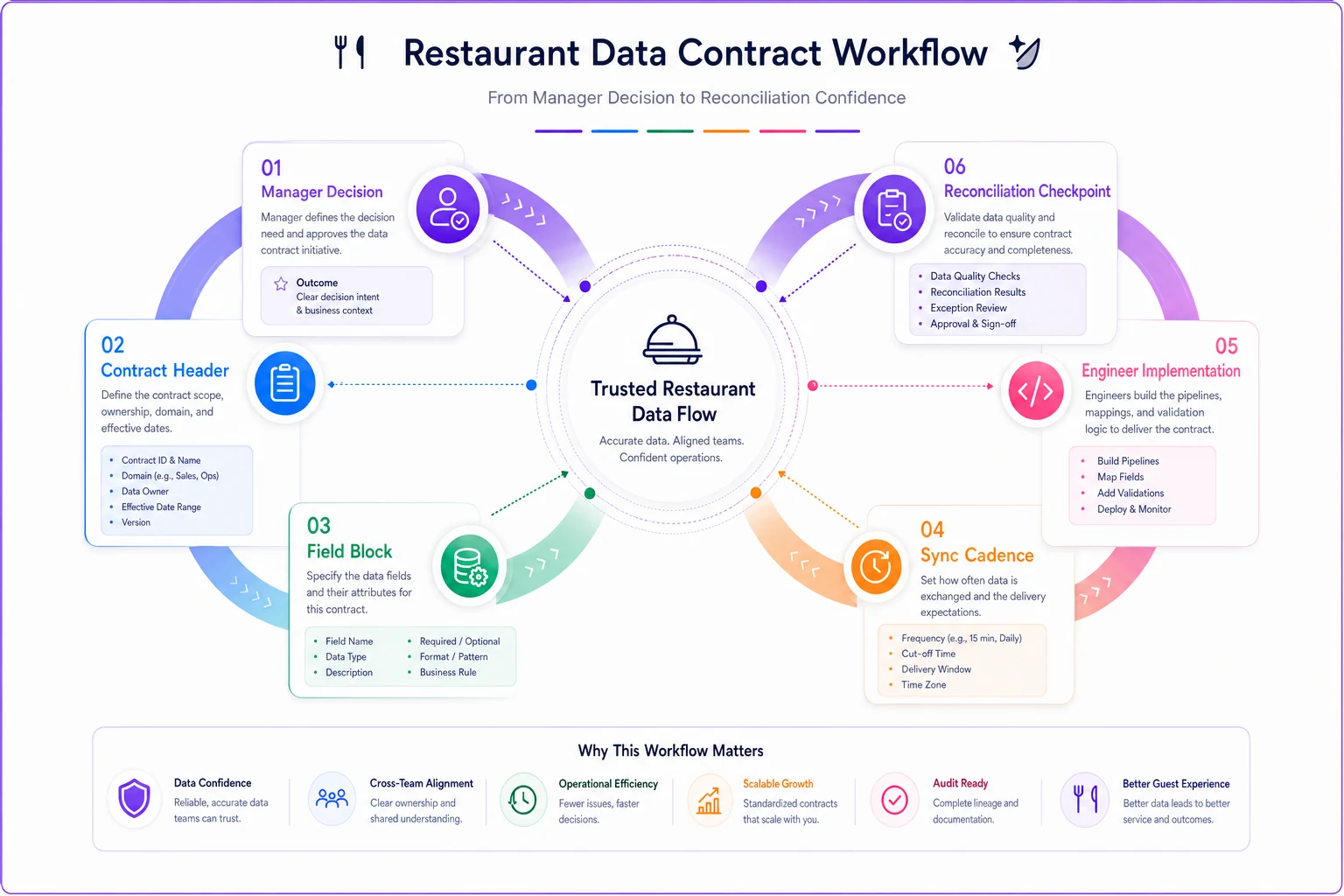
Use the diagram as a checklist: name the decision, list the fields, assign owners, set cadence, and schedule the checkpoint.
A real scenario: two locations, one broken definition
A small two-location group — casual dining, roughly $2.1M combined annual — connected their POS to a new inventory and purchasing tool. Clean install, syncs ran green, everyone moved on.
About six weeks in, food cost at Location B crept from around 29% to just over 34% with no obvious cause. Same menu, same suppliers, same volume. The kitchen manager assumed waste or portioning and spent two weeks tightening the line. Barely moved.
The actual problem was a field definition. Location B had a handful of combo items where the POS reported the combo as sold but the recipe mapping only decremented one of the three components. Inventory depletion ran low, reorder suggestions ran low, so the buyer over-ordered to compensate off gut, and the theoretical-vs-actual gap widened every week. No reconciliation checkpoint existed to catch it because the sync "worked."
Once they added a weekly depletion-vs-usage reconciliation with a 5% flag, the combo-mapping error surfaced in the first pass. Fixing the recipe mapping and adding the checkpoint pulled food cost back near 30% within a month. No new software, no staffing change — just a defined field and a scheduled comparison that should've existed from day one.
The lesson isn't "combos are tricky." It's that a green sync status told everyone the data was fine when the contract was broken, and there was no checkpoint designed to disagree.
When to build this — and when it's overkill
A full data contract layer isn't free to maintain, so it's worth being honest about when it actually pays off.
When this makes sense:
-
You're running more than one location, or planning to. Definitions that drift silently at one location become chaos across three.
-
You're feeding forecasting or automated purchasing off your data. Bad contracts poison forecasts fast — worth reading through the phased pilot roadmap for forecasting before you trust any model built on unvalidated fields.
-
You've had at least one "why don't these numbers match?" fire drill. That's the signal.
When it's overkill:
-
Single location, one POS, no downstream integrations, decisions made by an owner who's on the floor every shift and knows the numbers cold. Formalizing contracts before you have systems to connect is busywork.
Who should NOT start here:
-
Restaurants whose core data entry is still sloppy. If voids aren't being coded, comps aren't tagged, and items get rung under "misc," a data contract just formalizes garbage. Fix the input discipline first, then build contracts on top of clean signals.
Be honest about where you are before you build a formal contract layer. Otherwise you're paying to document noise.
How this holds up as you grow
At one location, the manager is the reconciliation layer. They notice when Tuesday's prep feels off because they've stood on that line for three years. That intuition doesn't scale, and it doesn't transfer to a new GM at a second site.
What changes as you add locations is that every undefined field multiplies. One ambiguous "covers" definition across four systems and three locations is twelve chances to disagree. The restaurants that scale cleanly are the ones that wrote down what their numbers mean before they needed to, so a new location inherits the definitions instead of reinventing them badly.
Modern operational platforms make this easier by enforcing field definitions and flagging variance automatically, so reconciliation becomes a review of exceptions instead of a manual number-hunt. But the tool only enforces the contract you actually wrote. The thinking still has to happen first, on paper, between the person who runs the floor and the person who builds the connection.
Start with the three decisions that keep the place alive — prep, reorder, staffing — write the minimal contract for each, set the sync cadence to match how fast the decision moves, and schedule the checkpoint that's allowed to tell you the sync is lying. Everything downstream gets more trustworthy from there, which is the only reason to connect systems in the first place.
Start with the three decisions that keep the place alive — prep, reorder, staffing — write the minimal contract for each, set the sync cadence to match how fast the decision moves, and schedule the checkpoint that's allowed to tell you the sync is lying. Everything downstream gets more trustworthy from there, which is the only reason to connect systems in the first place.
Ready to elevate your restaurant operations?
Join 2,000+ restaurants using Dineoly to enhance efficiency, increase table turnover, and delight diners.